Sallynda Script: A Modern Script Font for Digital Branding
Recently, I was working on a boutique online store redesign for a client who wanted to reflect a more artistic and personal brand identity. The challenge was to create a visual language that felt both elegant and approachable. After testing several fonts, I came across Sallynda Script, and it immediately stood out as a strong contender.
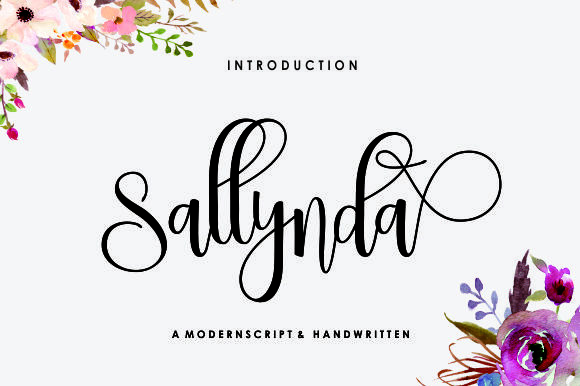
Sallynda Script is a modern script font created with a brush and ink, featuring an irregular baseline that adds character and movement. It has a natural, handcrafted feel that feels fresh and contemporary. Unlike some overly stylized script fonts, Sallynda maintains readability while still offering a distinctive personality. This balance makes it ideal for a wide range of digital applications, from headers to decorative accents.
Testing Sallynda Script in a Real Project
I first tested Sallynda Script in the hero section of the boutique’s homepage. Placing it over a watercolor background, I noticed how its fluid lines interacted with the image. The font’s irregular baseline gave the text a sense of motion, which complemented the organic nature of the design. However, I also considered how it would perform on mobile devices.
On smaller screens, I made sure to adjust the font size and spacing to maintain legibility. While script fonts can sometimes struggle with readability at small sizes, Sallynda Script performed well when paired with proper line height and letter spacing. It was clear enough for users to read quickly, which is essential for maintaining engagement on a landing page or product page.
Where to Use Sallynda Script
Sallynda Script works best in areas where you want to make a visual impact without overwhelming the user. It’s perfect for:
- Hero sections – especially those with image overlays or soft backgrounds.
- Call-to-action buttons – adding a touch of elegance to primary actions.
- Logo text – giving a creative brand a unique visual identity.
- Blog headers – making headlines stand out while keeping the tone friendly and approachable.
- Course sales pages – emphasizing key phrases like “Start Now” or “Join Today.”
- Decorative accents – using it sparingly to add visual interest to headers or sidebars.
It’s important to note that Sallynda Script is not meant for body copy. Its decorative nature makes it less suitable for long paragraphs or dense text blocks. Instead, pair it with a clean sans serif or serif font for body content to ensure a balanced and professional look.
Font Pairing and Readability
When pairing Sallynda Script with other fonts, I chose a simple sans serif font like Montserrat for the body text. This contrast helped guide the user’s eye through the content while allowing the script to shine in key areas. For a more editorial feel, I’ve also used it alongside a serif font like Playfair Display, creating a sophisticated and refined aesthetic.
Readability is crucial, especially on responsive layouts. I made sure to test Sallynda Script across different screen sizes and device orientations. On dark backgrounds, I increased the contrast by using a lighter color for the text, ensuring it remained legible. Conversely, on light backgrounds, I adjusted the font weight slightly to avoid blending into the page.
For mobile-first design, I kept the font size above 18px for headers and ensured adequate padding around the text. This helped prevent cramped layouts and improved the overall user experience. Additionally, I checked the font’s performance on fast-loading pages, making sure it didn’t slow down the site’s load time.
Commercial Font Licensing and Webfont Availability
Before implementing Sallynda Script on the client’s website, I reviewed the font’s licensing details. It’s a commercial font, which means it can be used on websites, landing pages, and brand assets. The font includes multiple weights and alternates, giving designers flexibility in their typographic choices.
Also, the font supports various file formats, including webfonts, which are essential for fast loading on digital platforms. Checking the included styles and ensuring compatibility with different browsers was a priority. With these considerations in place, I felt confident integrating Sallynda Script into the project.
Conclusion
Using Sallynda Script in this boutique project allowed me to create a cohesive and visually engaging brand identity. Its unique style and readability made it a great fit for the client’s vision. Whether you’re designing a portfolio, a course landing page, or a blog header, Sallynda Script offers a versatile and stylish option for your digital projects.